
Speed and passion, quality first
To accelerate innovation and safeguard qualityOur end-to-end service is a highly collaborative and seamless' highway '
Date:2019-08-13
Dongguan Bosi Hardware focuses on 12 years of research and development, as well as precision productionshield canHow to ensure that the high-quality shielding covers we produce are well mounted on PCB boards is also a matter of knowledge. Below, we will explain in detail the key points of manual soldering for correctly mounting shielding cover components.
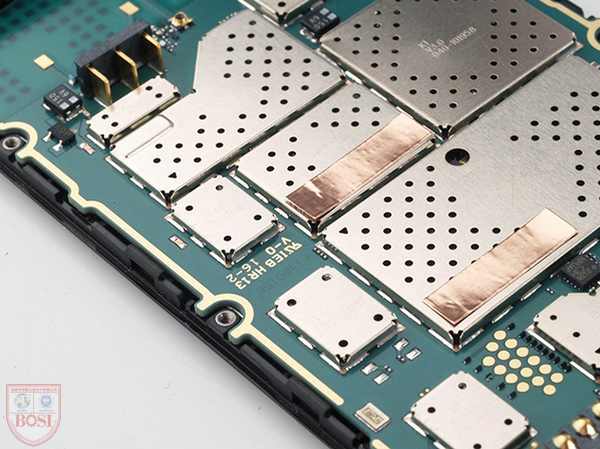
oneRequired equipment:
1 hot air gun, 1 anti-static soldering iron, 1 mobile phone board, 1 pair of tweezers, appropriate amount of low melting point solder wire, rosin flux (soldering flux), solder suction wire, and appropriate amount of board washing water
Specific steps:
1. Turn on the hot air gun, adjust the air volume and temperature to the appropriate position at 230 degrees Celsius. 4. Speed: feel the air volume and temperature of the air duct with your hand; Observe whether there is any unstable temperature phenomenon in the air duct due to air volume.
Observe that the interior of the air duct is slightly red. Prevent overheating inside the air duct.
Use paper to observe the distribution of heat. Find the temperature center.
4. Application and precautions of air nozzles.
Blow a resistor at the lowest temperature, remember the position where the lowest temperature twist can blow down the resistor the most.
2) White light digital display hot air gun:
Adjust the air volume knob to place the steel ball indicating the air volume in the middle position.
Adjust the temperature control to set the temperature reading around 380 ℃.
Attention: When the hot air gun is not used for a short period of time, it should be put into sleep mode (press the sleep switch on the handle, if there is no switch on the handle, the air nozzle will work when it is down, and sleep when it is up). If it does not work for more than 5 minutes, the hot air gun should be turned off.
3) White light 936 digital display constant temperature anti-static soldering iron:
1. The temperature is generally set at 300 ℃. If it is used for welding small components, the temperature can be adjusted downwards. If the component being welded is large or is welded on a large area of metal (such as a large copper foil on the ground wire), the temperature should be adjusted upwards appropriately.
2. The soldering iron tip must be kept white with tin, and if it turns gray, it must be treated with a special sponge.
3. When welding, do not apply force to the solder joints, otherwise it will damage the PCB board and soldering iron tip.
4. Do not turn off the power of the soldering iron for a long time to avoid idle burning.
5. Electric soldering iron is generally used for disassembling and soldering small components, handling solder joints, short circuits, soldering, and wire flying work.
2、 Using a hot air gun to disassemble and solder flat package ICs:
1) Steps for disassembling the flat package IC:
Before removing the components, make sure to check the direction of the IC and do not reverse it when reinstalling.
2. Observe whether there are heat sensitive components (such as LCD, plastic components, BGA ICs with sealing glue, etc.) next to and on the front and back of the IC. If there are any, cover them with shielding covers or similar items.
Adding appropriate rosin to the pins of the IC to be removed can make the solder pads of the PCB board smooth after removing the components, otherwise burrs may occur and it will be difficult to align when re soldering.
Four adjusted hot air guns are uniformly preheated in an area of about 20 square centimeters around the component (the nozzle is about 1cm away from the PCB board, and moves quickly at the preheating position, with the temperature on the PCB board not exceeding 130-160 ℃)
1) Remove moisture from the PCB to avoid "bubbling" during repair.
2) Avoid stress warping and deformation between PCB pads caused by excessive temperature difference between the upper and lower sides due to rapid heating on one side (top) of the PCB board.
3) Reduce the thermal shock of parts in the soldering area caused by heating above the PCB board.
4) Prevent the adjacent IC from peeling off and warping due to uneven heating
5) Circuit board and component heating: The hot air gun nozzle should be about 1cm away from the IC, and slowly and evenly move along the edge of the IC. Use tweezers to gently clamp the diagonal part of the IC.
6) If the solder joint has been heated to the melting point, the hand holding the tweezers will feel it immediately. Be sure to wait until all the solder on the IC pins has melted before carefully lifting the component vertically from the board with "zero force". This can avoid damaging the PCB or IC and also prevent solder short circuits left on the PCB board. Heating control is a key factor in rework, and the solder must be completely melted to avoid damaging the solder pads when removing components. At the same time, it is necessary to prevent excessive heating of the board and avoid twisting it due to heating.
(For example, if conditions permit, 140 ℃ -160 ℃ can be chosen for preheating and low-level heating for reheating. The entire process of disassembling the IC should not exceed 250 seconds)
7) After removing the IC, observe whether the solder joints on the PCB board are short circuited. If there is a short circuit, use a hot air gun to reheat it. After the solder at the short circuit melts, use tweezers to gently draw along the short circuit, and the solder will naturally separate. Try not to use a soldering iron for processing, as it will take away the solder on the PCB board. If there is less solder on the PCB board, it will increase the possibility of virtual soldering. However, it is not easy to solder the pads of small pins.
2) Steps for installing flat IC
1. Observe whether the IC pins to be installed are flat. If there is a solder short circuit in the IC pins, use a solder wire to handle it; If the IC pins are uneven, place them on a flat plate and use flat tweezers to press them flat; If the IC pin is not aligned, a surgical knife can be used to correct the crooked part.
Place an appropriate amount of soldering flux on the two solder pads. Excessive heating will cause the IC to float away, while insufficient heating will not have the desired effect. And cover and protect the surrounding heat sensitive components.
Place the flat IC in its original direction on the solder pad, align the IC pins with the PCB board pins, and observe vertically downwards when aligning. The pins on all four sides should be aligned, and visually feel that the lengths of the pins on all four sides are consistent, and the pins are straight and not skewed. The adhesion phenomenon of rosin when exposed to heat can be utilized to stick IC.
4. Use a hot air gun to preheat and heat the IC. Pay attention to the fact that the hot air gun cannot stop moving throughout the process (if it stops moving, it will cause local temperature rise and damage). While heating, observe the IC carefully. If the IC moves again, gently adjust it with tweezers without stopping the heating. If there is no displacement phenomenon, as long as the solder under the IC pin has melted, it should be detected as soon as possible (if the solder has melted, slight sinking of the IC, light smoke from rosin, and shiny solder can be found). You can also gently touch the small components next to the IC with tweezers. If the small components next to the IC are moving, it means that the solder under the IC pin is also close to melting. )And immediately stop heating. Because the temperature set by the hot air gun is relatively high, the temperature on the IC and PCB board continues to increase. If not detected early, excessive temperature rise can damage the IC or PCB board. So the heating time must not be too long.
After the PCB board cools down, clean and blow dry the solder joints with Tianna water (or board washing water). Check for virtual soldering and short circuits.
If there is virtual soldering, you can use a soldering iron to solder one pin at a time or use a hot air gun to remove the IC and solder it again; If there is a short circuit, you can use a damp heat-resistant sponge to wipe the soldering iron tip clean, then dip it in rosin and gently brush along the pin at the short circuit to remove the solder at the short circuit. Or use solder suction wires for treatment: Use tweezers to pick out four solder suction wires dipped in a small amount of rosin, place them at the short circuit, gently press them with a soldering iron, and the solder at the short circuit will melt and stick to the solder suction wires, clearing the short circuit.
Alternatively, you can use an electric soldering iron to solder the IC. After aligning the IC with the solder pad, dip the soldering iron in rosin and gently stroke along the edges of the IC pins; If the pin spacing of the IC is large, rosin can also be added and soldered by rolling a soldering iron with a tin ball over all the pins.
3、 Use a hot air gun to remove and weld heat sensitive components
1) Disassemble components:
Generally, plastic components such as cable clamps, inline sockets, sockets, SIM card holders, battery contacts, and tail plugs are prone to deformation when heated. If they are indeed damaged, they can be removed like soldering a regular IC. If you want to remove them and keep them intact, you need to handle them carefully. There is a rotating wind hot air gun with uniform air volume and heat, which generally does not damage plastic components. If using a regular air gun, consider placing the PCB board on the edge of the table and heating the front and back of the component from bottom to top with the air gun. The heat is transferred to the top through the PCB board and can be removed when the solder melts; You can also cover a waste chip of the same size on top of the heat sensitive component, and then use a heat gun to heat the edge of the chip. After the solder underneath melts, the plastic component can be removed.
2) : Component installation:
Organize the solder pads on the PCB board, dip an appropriate amount of soldering flux on the component pins and place them near the solder pads to allow them to also receive some heat. Heat the PCB board with a hot air gun until the solder on the board lights up, indicating that it has melted. Quickly place the components accurately on the solder pads. At this point, the air gun cannot stop moving and heating. Use tweezers to adjust the components in a short period of time, and immediately remove the air gun. This method is also applicable for installing power amplifiers and power ICs with large heat dissipation areas.
Some devices can be easily soldered with a soldering iron (such as SIM card holders), so do not use a soldering gun.
Four disassembly soldering of small components such as resistive capacitive transistors
1) Disassemble components:
Add an appropriate amount of rosin to the component, gently clamp the component with tweezers, and use a hot air gun to evenly move and heat the small component (same as removing and soldering IC). When the hand holding the tweezers feels that the solder has melted, the component can be removed.
2. Use a soldering iron to add an appropriate amount of solder to the component, with the solder covering the solder joints on both sides of the component as the standard. Place the tip of the soldering iron flat on the side of the component, so that the newly added solder is in a melted state, and then remove the component. If the component is large, you can add more tin on the component solder joints, clamp the component with tweezers, and quickly heat the two solder joints in sequence with a soldering iron until both solder joints are in a melted state, then you can remove them.
2) : Component installation:
Add an appropriate amount of rosin to the component, gently clamp the component with tweezers to align it with the solder joint, and use a hot air gun to evenly move and heat the small component. Wait for the solder under the component to melt, and then release the tweezers. (Alternatively, you can place the components and heat them up. After the solder melts, touch the components with tweezers to align them.)
Gently clamp the component with tweezers and use a soldering iron to tap on each pin of the component to solder it. If there is less solder on the solder joint, a small solder bead can be placed on the tip of the soldering iron and added to the pin of the component.
Use a hot air gun to remove the welding shield cover:
1) : Remove the shielding cover:
Clamp the PCB board with a fixture, clamp the shielding cover with tweezers, heat the entire shielding cover with a hot air gun, and lift it vertically after the solder melts. Because dismantling the shielding cover requires a high temperature, other components on the PCB board may also loosen. When removing the shielding cover, the motherboard should not be movable to avoid vibrating and shifting the components on the board. When removing the shielding cover, it should be lifted vertically to avoid moving the components inside the shielding cover. You can also lift up the three sides of the shielding cover first, wait for it to cool down, and then fold it back a few times to break the last side and remove the shielding cover.
2) Install shielding cover:
Place the shielding cover on the PCB board and heat it up with an air gun around until the solder melts. You can also use a soldering iron to select a few spot welds on the PCB board.
Six welding virtual soldering components:
1) : Use a soldering gun for welding
Add a small amount of rosin to the parts of the PCB board that need to be soldered, and heat them evenly with an air gun until the solder in the soldered area melts. Alternatively, gently touch the suspected component with tweezers while the solder is melted to enhance the soldering effect.
2) : Use an electric soldering iron to solder
For soldering a small number of components, if it is soldering an IC, a small amount of rosin can be added to the IC pins, and a smooth soldering iron tip can be used to solder along the pins one by one. Be sure to clean the residual tin on the soldering iron tip, otherwise it will cause a short circuit in the pins. If it is to solder small components such as resistors and transistors, simply dip a soldering iron tip in rosin and solder the component pins. Sometimes, in order to increase the soldering strength, a small amount of solder can be added to the component pins.
1、 Required equipment:
1 hot air gun, 1 anti-static soldering iron, 1 mobile phone board, 1 pair of tweezers, appropriate amount of low melting point solder wire, rosin flux (soldering flux), solder suction wire, and appropriate amount of board washing water
Specific steps:
1. Turn on the hot air gun, adjust the air volume and temperature to the appropriate position at 230 degrees Celsius. 4. Speed: feel the air volume and temperature of the air duct with your hand; Observe whether there is any unstable temperature phenomenon in the air duct due to air volume.
Observe that the interior of the air duct is slightly red. Prevent overheating inside the air duct.
Use paper to observe the distribution of heat. Find the temperature center.
4. Application and precautions of air nozzles.
Blow a resistor at the lowest temperature, remember the position where the lowest temperature twist can blow down the resistor the most.
2) White light digital display hot air gun:
Adjust the air volume knob to place the steel ball indicating the air volume in the middle position.
Adjust the temperature control to set the temperature reading around 380 ℃.
Attention: When the hot air gun is not used for a short period of time, it should be put into sleep mode (press the sleep switch on the handle, if there is no switch on the handle, the air nozzle will work when it is down, and sleep when it is up). If it does not work for more than 5 minutes, the hot air gun should be turned off.
3) White light 936 digital display constant temperature anti-static soldering iron:
1. The temperature is generally set at 300 ℃. If it is used for welding small components, the temperature can be adjusted downwards. If the component being welded is large or is welded on a large area of metal (such as a large copper foil on the ground wire), the temperature should be adjusted upwards appropriately.
2. The soldering iron tip must be kept white with tin, and if it turns gray, it must be treated with a special sponge.
3. When welding, do not apply force to the solder joints, otherwise it will damage the PCB board and soldering iron tip.
4. Do not turn off the power of the soldering iron for a long time to avoid idle burning.
5. Electric soldering iron is generally used for disassembling and soldering small components, handling solder joints, short circuits, soldering, and wire flying work.
2、 Using a hot air gun to disassemble and solder flat package ICs:
1) Steps for disassembling the flat package IC:
Before removing the components, make sure to check the direction of the IC and do not reverse it when reinstalling.
2. Observe whether there are heat sensitive components (such as LCD, plastic components, BGA ICs with sealing glue, etc.) next to and on the front and back of the IC. If there are any, cover them with shielding covers or similar items.
Adding appropriate rosin to the pins of the IC to be removed can make the solder pads of the PCB board smooth after removing the components, otherwise burrs may occur and it will be difficult to align when re soldering.
Four adjusted hot air guns are uniformly preheated in an area of about 20 square centimeters around the component (the nozzle is about 1cm away from the PCB board, and moves quickly at the preheating position, with the temperature on the PCB board not exceeding 130-160 ℃)
1) Remove moisture from the PCB to avoid "bubbling" during repair.
2) Avoid stress warping and deformation between PCB pads caused by excessive temperature difference between the upper and lower sides due to rapid heating on one side (top) of the PCB board.
3) Reduce the thermal shock of parts in the soldering area caused by heating above the PCB board.
4) Prevent the adjacent IC from peeling off and warping due to uneven heating
5) Circuit board and component heating: The hot air gun nozzle should be about 1cm away from the IC, and slowly and evenly move along the edge of the IC. Use tweezers to gently clamp the diagonal part of the IC.
6) If the solder joint has been heated to the melting point, the hand holding the tweezers will feel it immediately. Be sure to wait until all the solder on the IC pins has melted before carefully lifting the component vertically from the board with "zero force". This can avoid damaging the PCB or IC and also prevent solder short circuits left on the PCB board. Heating control is a key factor in rework, and the solder must be completely melted to avoid damaging the solder pads when removing components. At the same time, it is necessary to prevent excessive heating of the board and avoid twisting it due to heating.
(For example, if conditions permit, 140 ℃ -160 ℃ can be chosen for preheating and low-level heating for reheating. The entire process of disassembling the IC should not exceed 250 seconds)
7) After removing the IC, observe whether the solder joints on the PCB board are short circuited. If there is a short circuit, use a hot air gun to reheat it. After the solder at the short circuit melts, use tweezers to gently draw along the short circuit, and the solder will naturally separate. Try not to use a soldering iron for processing, as it will take away the solder on the PCB board. If there is less solder on the PCB board, it will increase the possibility of virtual soldering. However, it is not easy to solder the pads of small pins.
2) Steps for installing flat IC
1. Observe whether the IC pins to be installed are flat. If there is a solder short circuit in the IC pins, use a solder wire to handle it; If the IC pins are uneven, place them on a flat plate and use flat tweezers to press them flat; If the IC pin is not aligned, a surgical knife can be used to correct the crooked part.
Place an appropriate amount of soldering flux on the two solder pads. Excessive heating will cause the IC to float away, while insufficient heating will not have the desired effect. And cover and protect the surrounding heat sensitive components.
Place the flat IC in its original direction on the solder pad, align the IC pins with the PCB board pins, and observe vertically downwards when aligning. The pins on all four sides should be aligned, and visually feel that the lengths of the pins on all four sides are consistent, and the pins are straight and not skewed. The adhesion phenomenon of rosin when exposed to heat can be utilized to stick IC.
4. Use a hot air gun to preheat and heat the IC. Pay attention to the fact that the hot air gun cannot stop moving throughout the process (if it stops moving, it will cause local temperature rise and damage). While heating, observe the IC carefully. If the IC moves again, gently adjust it with tweezers without stopping the heating. If there is no displacement phenomenon, as long as the solder under the IC pin has melted, it should be detected as soon as possible (if the solder has melted, slight sinking of the IC, light smoke from rosin, and shiny solder can be found). You can also gently touch the small components next to the IC with tweezers. If the small components next to the IC are moving, it means that the solder under the IC pin is also close to melting. )And immediately stop heating. Because the temperature set by the hot air gun is relatively high, the temperature on the IC and PCB board continues to increase. If not detected early, excessive temperature rise can damage the IC or PCB board. So the heating time must not be too long.
After the PCB board cools down, clean and blow dry the solder joints with Tianna water (or board washing water). Check for virtual soldering and short circuits.
If there is virtual soldering, you can use a soldering iron to solder one pin at a time or use a hot air gun to remove the IC and solder it again; If there is a short circuit, you can use a damp heat-resistant sponge to wipe the soldering iron tip clean, then dip it in rosin and gently brush along the pin at the short circuit to remove the solder at the short circuit. Or use solder suction wires for treatment: Use tweezers to pick out four solder suction wires dipped in a small amount of rosin, place them at the short circuit, gently press them with a soldering iron, and the solder at the short circuit will melt and stick to the solder suction wires, clearing the short circuit.
Alternatively, you can use an electric soldering iron to solder the IC. After aligning the IC with the solder pad, dip the soldering iron in rosin and gently stroke along the edges of the IC pins; If the pin spacing of the IC is large, rosin can also be added and soldered by rolling a soldering iron with a tin ball over all the pins.
3、 Use a hot air gun to remove and weld heat sensitive components
1) Disassemble components:
Generally, plastic components such as cable clamps, inline sockets, sockets, SIM card holders, battery contacts, and tail plugs are prone to deformation when heated. If they are indeed damaged, they can be removed like soldering a regular IC. If you want to remove them and keep them intact, you need to handle them carefully. There is a rotating wind hot air gun with uniform air volume and heat, which generally does not damage plastic components. If using a regular air gun, consider placing the PCB board on the edge of the table and heating the front and back of the component from bottom to top with the air gun. The heat is transferred to the top through the PCB board and can be removed when the solder melts; You can also cover a waste chip of the same size on top of the heat sensitive component, and then use a heat gun to heat the edge of the chip. After the solder underneath melts, the plastic component can be removed.
2) : Component installation:
Organize the solder pads on the PCB board, dip an appropriate amount of soldering flux on the component pins and place them near the solder pads to allow them to also receive some heat. Heat the PCB board with a hot air gun until the solder on the board lights up, indicating that it has melted. Quickly place the components accurately on the solder pads. At this point, the air gun cannot stop moving and heating. Use tweezers to adjust the components in a short period of time, and immediately remove the air gun. This method is also applicable for installing power amplifiers and power ICs with large heat dissipation areas.
Some devices can be easily soldered with a soldering iron (such as SIM card holders), so do not use a soldering gun.
Four disassembly soldering of small components such as resistive capacitive transistors
1) Disassemble components:
Add an appropriate amount of rosin to the component, gently clamp the component with tweezers, and use a hot air gun to evenly move and heat the small component (same as removing and soldering IC). When the hand holding the tweezers feels that the solder has melted, the component can be removed.
2. Use a soldering iron to add an appropriate amount of solder to the component, with the solder covering the solder joints on both sides of the component as the standard. Place the tip of the soldering iron flat on the side of the component, so that the newly added solder is in a melted state, and then remove the component. If the component is large, you can add more tin on the component solder joints, clamp the component with tweezers, and quickly heat the two solder joints in sequence with a soldering iron until both solder joints are in a melted state, then you can remove them.
2) : Component installation:
Add an appropriate amount of rosin to the component, gently clamp the component with tweezers to align it with the solder joint, and use a hot air gun to evenly move and heat the small component. Wait for the solder under the component to melt, and then release the tweezers. (Alternatively, you can place the components and heat them up. After the solder melts, touch the components with tweezers to align them.)
Gently clamp the component with tweezers and use a soldering iron to tap on each pin of the component to solder it. If there is less solder on the solder joint, a small solder bead can be placed on the tip of the soldering iron and added to the pin of the component.
Use a hot air gun to remove the welding shield cover:
1) : Remove the shielding cover:
Clamp the PCB board with a fixture, clamp the shielding cover with tweezers, heat the entire shielding cover with a hot air gun, and lift it vertically after the solder melts. Because dismantling the shielding cover requires a high temperature, other components on the PCB board may also loosen. When removing the shielding cover, the motherboard should not be movable to avoid vibrating and shifting the components on the board. When removing the shielding cover, it should be lifted vertically to avoid moving the components inside the shielding cover. You can also lift up the three sides of the shielding cover first, wait for it to cool down, and then fold it back a few times to break the last side and remove the shielding cover.
2) Install shielding cover:
Place the shielding cover on the PCB board and heat it up with an air gun around until the solder melts. You can also use a soldering iron to select a few spot welds on the PCB board.
Six welding virtual soldering components:
1) : Use a soldering gun for welding
Add a small amount of rosin to the parts of the PCB board that need to be soldered, and heat them evenly with an air gun until the solder in the soldered area melts. Alternatively, gently touch the suspected component with tweezers while the solder is melted to enhance the soldering effect.
2) : Use an electric soldering iron to solder
For soldering a small number of components, if it is soldering an IC, a small amount of rosin can be added to the IC pins, and a smooth soldering iron tip can be used to solder along the pins one by one. Be sure to clean the residual tin on the soldering iron tip, otherwise it will cause a short circuit in the pins. If it is to solder small components such as resistors and transistors, simply dip a soldering iron tip in rosin and solder the component pins. Sometimes, in order to increase the soldering strength, a small amount of solder can be added to the component pins.
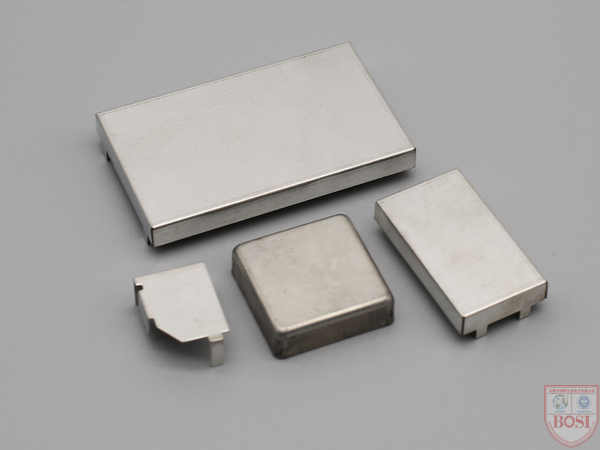
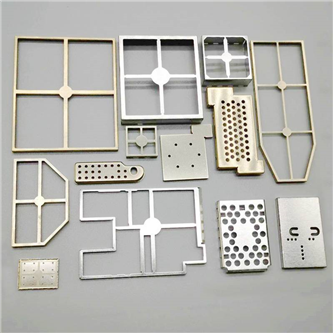
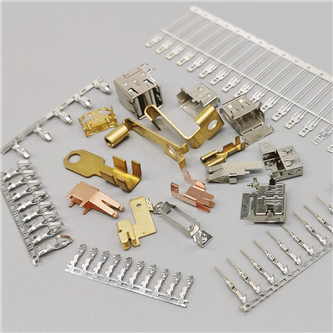
Bosi shielding cover has 12 years of experience in foreign trade export, with guaranteed quality and industry-leading technology!We only customize high-quality metal stamping parts, and our company has passed ISO9001:2015, IATF 16949 certification, the product is highly favored by new and old customers!Choosing Bosch is equivalent to choosing high quality!At present, Bosch has over 200 types of shielding case samples and molds, which roughly cover various specifications of shielding cases required by users, saving customers time and cost in mold making and sampling. You only need to provide the size, and we will quickly provide you with a quotation and similar shielding case sample drawings.
If you are interested in purchasing shielding covers, please call our 24-hour customer service hotline13712595862You can also add our customer service WeChat and long press to recognize the QR code below. We are dedicated to serving you!

Contact: Manager Wang(24-hour consultation hotline)







 Language
 Your location:
.jpg)


 Official account
 0769-82928019
 E-mail